Find your frame. Before you shoot.
Find your frame.
GudoCam guides you.
Frame your scene. Place your subject.
Guidance, right on your camera.
Free download · In-app purchases
See how it helps

- 1 Zoom
- 2 Frame
- 3 Exposure
- 4 Compare
Bring your subject a little closer.
Tap the green capsule to apply.
For one person, apply zoom, then drag in any direction to turn the camera. For a group, start dragging straight away. The orange dashed triangle and yellow placement boxes stay fixed. Reaching the example frame shows web demo completion below the photo. You can also focus the photo and use arrow keys, Shift with arrow keys for larger moves, or Align for me. In the portrait scene, apply exposure after aligning. Escape restarts the current scene.
Step 1. Apply the suggested zoom.
Drag the divider to compare the starting photo on the left with your completed frame on the right. Use the left and right arrow keys, Home, or End. Escape restarts the demo.
01 — As you shoot
AI reads your scene.
Your guides fit the view.
AI (Artificial Intelligence) reads your current camera preview and shows you where to place your subject and how to frame the shot.

Subject placement
See where your subject belongs.
Subject markers and a placement area guide your framing.

Composition
Align the far shoreline with the upper guide and keep the nearby rock in the frame.
Move around to adjust placement in the frame
Composition lines & shooting advice
See how to frame the scene.
Guides and short advice help you decide your next move.
Before & After
The same scene.
A different frame.
See what changes when you adjust the subject and the space around them.

The foreground takes up much of the frame.

Move the person to the right and let the sunset into the frame.
Example photos illustrating a change in composition.
02 — Composition catalog
Pick an example.
Frame it with the guide.
51compositions
12free · 6 shooting scenes
A place for your subject. Lines to organize the frame. Every example below is a free composition.

Example photo and guides from the app catalog
In a placeFree composition
Centre Column
Centre Column
For a person and their surroundings, without strong lines or patterns to frame them
Center the person and leave room above to capture the sense of place.
Try it this way
Hold your phone upright at chest height and center the person. Leave space above the head and below the feet, with the top third for the setting.
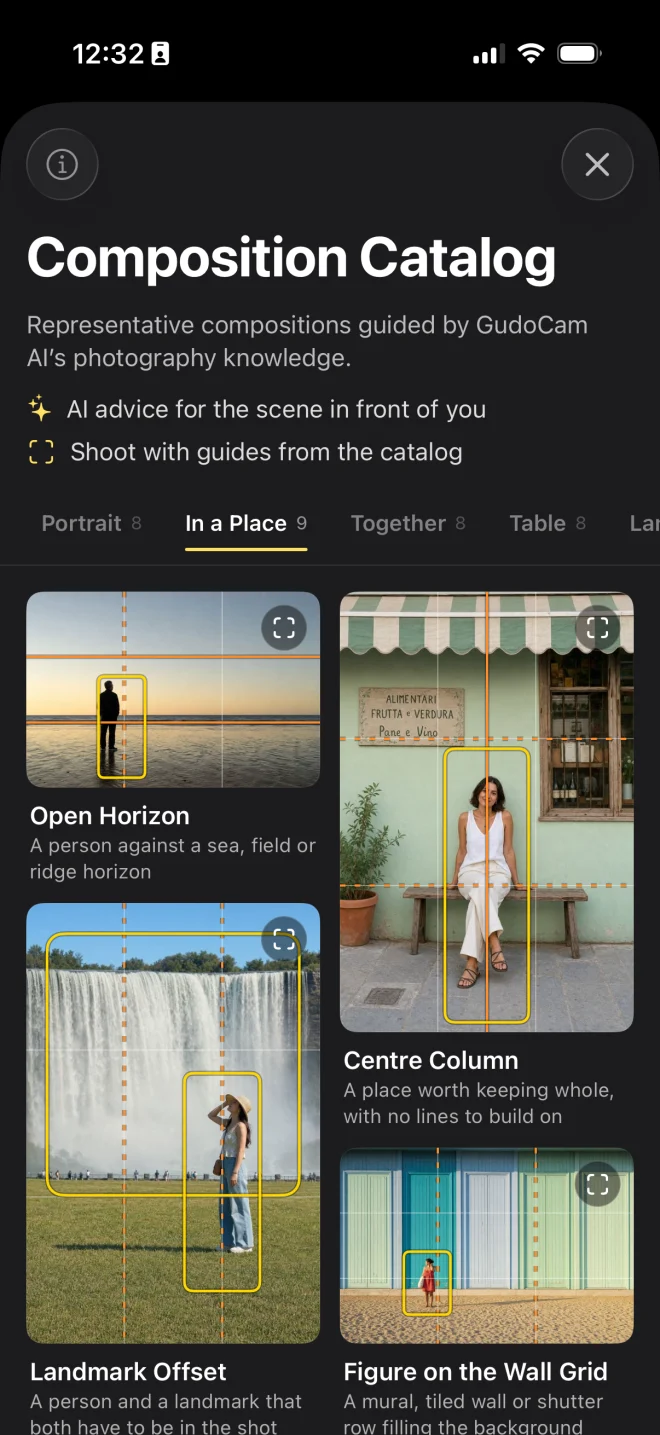
Pick an example in the app.
Its guide appears on your camera.Actual catalog screen · English
Showing the free Centre Column composition.
03 — Photo review
Let this photo
teach you about the next.
Ask for a review after you shoot.
See what worked and what to try differently.
01Look at your photo from several angles.
Composition · Lighting · Color · Focus · Aesthetics
02Take one useful idea into your next shot.
Read the feedback and put it into practice next time.
03Keep a record of your progress.
Collect photos you shot and reviewed with GudoCam in your portfolio.
04 — Make room for learning
A lighter way
to learn photography.
Guidance, right when you shoot.
Explore the catalog and photo reviews at your own pace.
About $14.29 / month
$4.99 / month
How did we compare?
A simple average of public prices from seven photography education services surveyed on September 12, 2026. Annual and fixed-term plans are converted to monthly equivalents, using September 11 exchange rates.
This is a selected sample, not a market-wide average or a claim of equal learning outcomes. Content, access terms, and prices differ.
View the seven sources: MasterClass · Skillshare · CreativeLive · KelbyOne · PPA PhotoVision · The School of Photography · Canon Academy
Current plans and prices are shown in the app. Store prices checked September 20, 2026. Start with free features, then choose what you need in the app.
Before you begin
A few things
to know.
Does the app take the photo for me?
GudoCam is a camera app that guides composition and subject placement before you shoot. You use the guidance to frame and take the photo yourself.
Can I use it for free?
Download free to start with basic shooting and composition guides. AI advice and photo reviews have usage or token limits; some catalog entries and extra features are paid. Check the app for current availability.
How are my photos handled?
Basic composition detection runs on your device. When you request AI shooting advice or a photo review, an image is sent to the server for analysis. Read our Privacy Policyfor details.
Which devices are supported?
Available on iPhone with iOS 16.0 or later. For Android, join the launch waitlistto hear when it is ready.
Does it generate new photos with AI?
Shooting advice and reviews help you take your own photos. The catalog and tutorials use illustrative images to explain composition.
Which composition guides are available?
Subject guides include Center Vertical, 1/3 Vertical, 2/3 Vertical, Cross, Triangle, and Circle. Structure guides include Triple Vertical, Triple Horizontal, Radial, Radial 1–4, and Center Horizontal. The catalog adds scene-based examples that explain how to use guides and placement boxes.
Is GudoCam the same as Gudak Cam?
No. Gudak Cam is a separate film-camera app by a different developer. GudoCam guides composition before you take a photo.
Composition gets easier when you compare it in the same scene.
Practical choices a smartphone beginner can use before pressing the shutter.

Where should a beginner start with composition?
A simple order for checking the subject, background, horizon, and space before capture.

Use the rule of thirds for portraits and landscapes
Learn where to place eyes, horizons, and looking room in real scenes.

Move beyond putting every person in the middle
Adjust distance, camera height, looking room, and background for more natural portraits.

A little more confidence in your next photo.